


MACBOOK PRO 15" 2018 A1990 Data Recovery
Zero Alpha offers professional data recovery for the A1990 MacBook Pro 15" 2018. Data loss can occur due to liquid damage, physical damage, logic board faults, or storage-related problems. We assess each device to determine the available recovery options. We accept mail in jobs from Australia and worldwide.

A1990 MacBook PRO 15" Common Problems
- Liquid damage affecting the logic board or other internal components.
- Logic board failure preventing the MacBook from powering on.
- Physical damage following a drop or impact.
- Power faults preventing the device from starting.
- File system corruption or inaccessible user data.
- Failed macOS updates or software problems preventing normal startup.
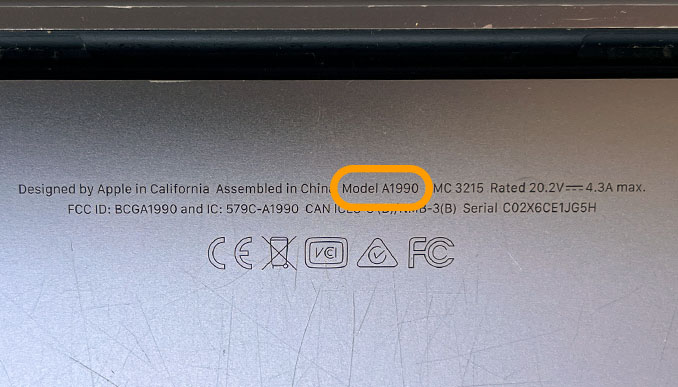
You can find the A1990 model number on the back fine print.
MACBOOK PRO 15-INCH, 2018 A1990 Data Recovery Caselog
14OCT26: 2018 MacBook Pro was mailed in from the Sunshine Coast QLD for data recovery. This model A1990 will not turn on. We opened the inside and found it very dusty and dirty. The charge cable was only showing 5v. We removed the logic board and found a short circuit on Main PPBUS_G3H from capacitor C9081. We fixed this problem but the laptop would still not turn on. All 4 usb-c ports have same behaviour. start 5v, go up to 20v, current peaks at ~200mA, then sits at zero. 2V5 rail present for NANDs, but PP2V5_S3 not present. PP3V3_G3H_SOCPMU present, PPVCCPRIMCORE_PRIM_REG not present. Do not replace U7800. Instead, put device into DFU mode and select advanced, repair. The problem seems to be T2 not talking to the PMU correctly. Note, you need a battery connected for PMU to work. Best to completely assemble the device including the battery connector and small ribbon that floats over the battery terminal. The 2019 16" model has the same issue. We successfully recovered all the customers files. Please note we found that if the battery daughter board ribbon was disconnected then the laptop would not turn on.